
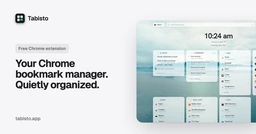
What is Tabisto?
Tabisto is a visual bookmark manager for Chrome users that replaces the new tab page with a calm dashboard. It helps users organize their bookmarks, notes, reminders, and tab sessions in a private and local-first environment. Tabisto is designed to work offline and opens instantly, providing a quiet and organized space for users to manage their links.
- Website
- tabisto.app
- Category
- Productivity
- Pricing
- Free plan with paid upgrades
- Compared with
- Pocket, Evernote, OneTab
About Tabisto
Tabisto works by allowing users to drop links into sections they arrange themselves, with icons loading from the browser. It also features workspaces, which enable users to keep personal, work, and side projects apart, and switch between them in one click. Additionally, Tabisto includes a command palette that finds any link in a few keystrokes, as well as reminders, saved sessions, and quick notes.
Tabisto is suitable for individuals who want to manage their bookmarks and tabs in a calm and organized manner. It is offered as a free version, which includes 2 workspaces, 25 bookmarks, 1 saved session, and 3 reminders, as well as a Pro version, which removes these limits and adds custom wallpaper uploads, advanced customization, and session history. The Pro version is available for $3.99 a month or $35.88 a year, with a 7-day free trial.
- The problem
- A buried bookmarks bar slows you down all day
- How it solves it
- Tabisto puts links, notes, reminders and tab sets into one calm page, open on every new tab
- What makes it different
- Private by design, local-first, and fast
Key features
- Visual bookmarks
- Workspaces
- Tab sessions
- Notes and reminders
- Offline access
- Customizable themes
Product details
Optional maker-provided information published with the launch. Confirm current details on the official website.
- Key features
- Visual bookmarks
- Workspaces
- Tab sessions
- Notes and reminders
- Offline access
- Customizable themes
- Pricing model
- Freemium
- Platforms
- Not provided
- Tech stack
- Not provided
How Tabisto works
- Install Tabisto
- Import bookmarks
- Arrange links into sections
Use cases
Organizing Bookmarks
Tabisto helps users organize their bookmarks into sections and workspaces, making it easy to find and access frequently used links.
Managing Tab Sessions
Tabisto allows users to save and restore tab sessions, enabling them to quickly switch between different projects or tasks.
Setting Reminders
Tabisto includes a reminder feature, which enables users to set reminders for specific links or tasks, helping them stay on track and organized.
Who Tabisto is for
- Individuals who want to manage their bookmarks and tabs in a calm and organized manner
- Users who need to switch between different projects or tasks
- Those who want to set reminders for specific links or tasks
Questions about Tabisto
What is Tabisto?
Tabisto is a visual bookmark manager for Chrome that replaces the new tab page with a calm dashboard.
Is Tabisto free?
Yes, Tabisto is free to install and use, with optional Pro upgrades.
Does Tabisto work offline?
Yes, Tabisto works offline with no sign-up required, and users can get 1 workspace and 25 bookmarks stored in their browser.
Is my data private?
Yes, Tabisto is local-first, meaning that user data lives in their browser, and nothing tracks the links they save.
Can I import my existing bookmarks?
Yes, Tabisto imports Chrome bookmarks in one step, and folders become sections.
Does Tabisto sync across devices?
Yes, once users sign in, their bookmarks, workspaces, notes, reminders, and themes follow them to every Chrome or Chromium browser where they use Tabisto.
This page was written from tabisto.app's own website on Nov 23, 2026. Prices and features can change, so check the website for the latest. Are you the maker? Claim it to edit and launch it, or remove it.
More Productivity
 Prime CalendarCoordinates shared schedules and automates routine work for individuals and teams
 WarrenProject management for teams of all kinds
 bytemailNative email app for Mac users
 TutarisOrganizes life in one place for individuals
 AithoAI teleprompter for presentations to help speakers stay on track
 Quick Capture ToolsQuick capture apps for iPhone and Mac users