
What is Lapser Studio?
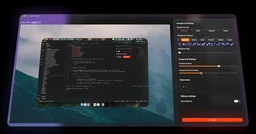
Lapser Studio is a native macOS app that creates beautiful timelapse recordings of your work in minutes. It is designed to streamline your recording and editing workflow. The app allows you to customize every aspect of your video and edit directly inside Lapser Studio. This saves hours of editing and exporting massive video recordings. Lapser Studio is built for macOS and prioritizes user privacy.
- Website
- lapser.studio
- Category
- Design & Creative Tools
- Platforms
- macos
- Compared with
- Adobe Premiere Pro, Final Cut Pro, DaVinci Resolve
About Lapser Studio
Lapser Studio works by allowing users to start recording sessions instantly from the menu bar. It has features such as automatic pause during inactivity and low CPU usage for long recording sessions. The app also allows for customizable capture intervals and export frame rates. Additionally, it provides multiple export options, including different resolutions and aspect ratios. Users can choose from various backgrounds, apply gradients, and position their webcam overlay as desired.
Lapser Studio is suitable for macOS users who want to create timelapse recordings of their work. It is sold as a one-time purchase, with a lifetime deal available for $30. Volume and bulk licensing options are also available with custom pricing. The app is designed to be easy to use and provides a range of features to customize your timelapse recordings.
- The problem
- Editing big video capture files can be time-consuming
- How it solves it
- Lapser Studio does the heavy lifting for users, allowing them to create and edit timelapse recordings quickly and easily
- What makes it different
- No cloud uploads, no accounts required, and no subscription models
Key features
- Customize video aspects
- Edit directly inside app
- Quick menu bar access
- Activity monitor
- Export in 720p to 4K
- Low CPU usage
Product details
Optional maker-provided information published with the launch. Confirm current details on the official website.
- Key features
- Customize video aspects
- Edit directly inside app
- Quick menu bar access
- Activity monitor
- Export in 720p to 4K
- Low CPU usage
- Pricing model
- Not provided
- Platforms
- macOS
- Tech stack
- Not provided
How Lapser Studio works
- Start recording from the menu bar
- Customize video settings
- Edit directly inside Lapser Studio
Use cases
Recording Work
Lapser Studio helps users record timelapses of their work, such as design, art, and coding sessions.
Creating Content
The app allows users to create a library of build-in-public content and a personal progress log.
Proof of Craft
Lapser Studio provides proof of craft and helps users demonstrate their skills.
Who Lapser Studio is for
- macOS users
- creatives and developers
- those who want to record their work process
Questions about Lapser Studio
What platform is Lapser Studio available on?
Lapser Studio is available on macOS as a native app.
How much does Lapser Studio cost?
Lapser Studio is available for a one-time purchase of $30, with volume and bulk licensing options available at custom prices.
Do I need to upload my recordings to the cloud?
No, Lapser Studio processes your recordings locally, and no cloud uploads are required.
Can I customize my timelapse recordings?
Yes, Lapser Studio allows you to customize every aspect of your video, including capture intervals, export frame rates, and backgrounds.
Is Lapser Studio a subscription-based service?
No, Lapser Studio is sold as a one-time purchase, with no subscription required.
This page was written from lapser.studio's own website on Nov 22, 2026. Prices and features can change, so check the website for the latest. Are you the maker? Claim it to edit and launch it, or remove it.
More Design & Creative Tools
 MakerollAI clip maker for TikTok, Reels and Shorts creators
 LoquendoConverts text to audio for storytellers
 LassoCutRemoves image backgrounds for e-commerce sellers
 SlotVFXAI animation and VFX studio for 2D games
 FontsightIdentifies fonts on web pages for designers and developers
 PlimoAI image and video generator for creating and editing content